
Somebody changed it. Nobody remembers who.

Kronikl records every change in your Azure tenant — the resource, the role grant, the policy edit — with the configuration either side of it. Read-only, and set up in about ten minutes.

Connect your tenant How it works

Azure Reader access · Admin consent, then one role assignment · Nothing to install

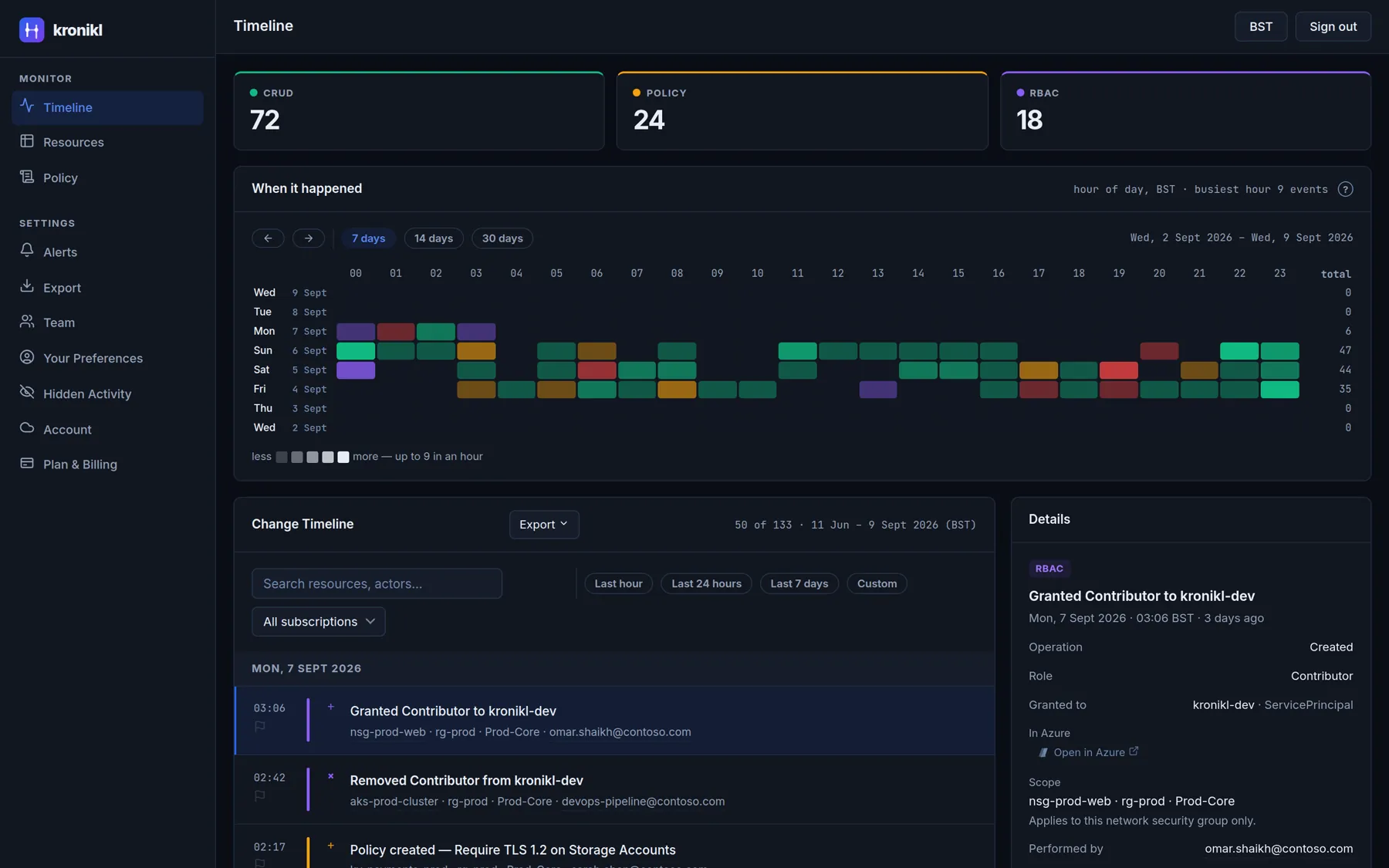
Kronikl's timeline screen: counters for CRUD, policy and RBAC changes; a heat map of when changes happened by hour and day; the change timeline with search and time filters, showing a Contributor role granted on nsg-prod-web; and a details pane naming the operation, the role, who it was granted to, the scope, and who performed it.

Azure shows you what is running today — Kronikl shows you what changed.

Azure Activity Log keeps 90 days of operations — a line saying a write happened. It does not keep what the configuration was before the write, or after it. Azure Resource Graph keeps 14 days of change records; past two weeks, the question when did this setting change has no answer in the portal.

Nobody remembers who widened the NSG rule. The auditor is asking about March, and the person who would know left in April.

Nothing to install.

Kronikl reads your tenant through Azure's own APIs and keeps its own history.

  1. Admin consent, in the browser

    A Global Administrator approves three read-only Microsoft Graph application permissions, plus two delegated scopes used only while you are signed in.

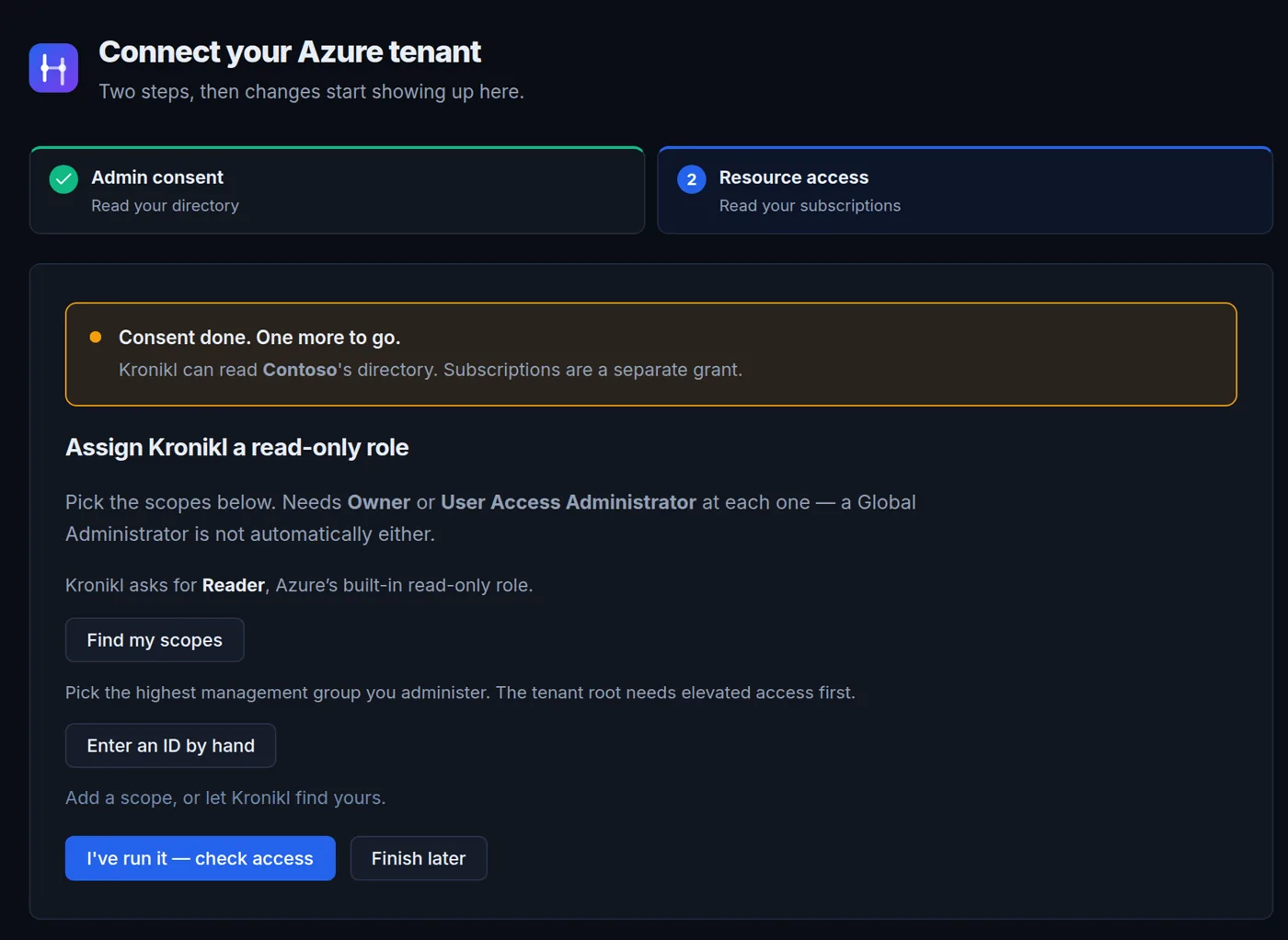
  2. An Azure RBAC role, granted by you

    You give Kronikl Azure's built-in Reader role over the subscriptions or management groups you pick. Create it in one click with your own Azure sign-in, or copy the command for Azure CLI, PowerShell, Terraform or Bicep and run it yourself.

  3. Recording starts

    Kronikl records the current state of everything visible, then keeps watching on a frequent schedule, so new changes appear shortly after they happen.

The Connect your Azure tenant screen after admin consent: step one, admin consent, done; step two, assign Kronikl the read-only Reader role at the scopes you pick, with Find my scopes and Enter an ID by hand, and a button to check access once the grant has been made.

What you can see

Who changed this Azure resource, and when

One feed of every change in your tenant — resources, policy and role assignments. Filter it by anything on the row. No query language.

  • Every administrative write, in one feed. Denied and failed operations are recorded too.
  • Routine platform events are hidden by default. One click shows them.
  • Every filter lives in the URL, so the view you are looking at is a link you can paste into a ticket.
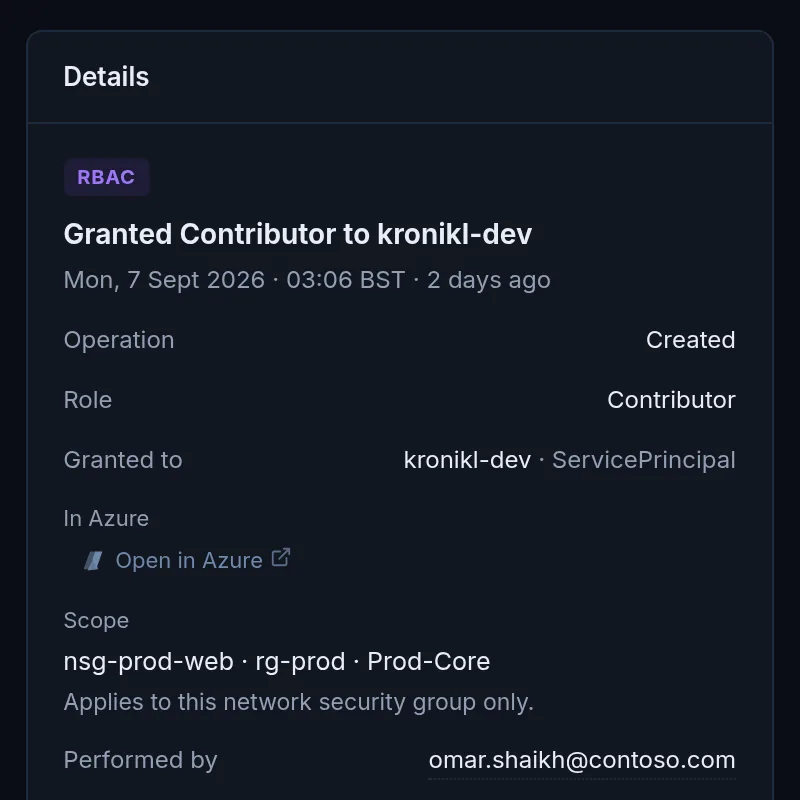
The details pane for one timeline event: RBAC, Granted Contributor to kronikl-dev, Monday 7 September 2026 03:06 BST. Operation: created. Role: Contributor. Granted to: kronikl-dev, a service principal. An Open in Azure link. Scope: nsg-prod-web in rg-prod in Prod-Core, applying to this network security group only. Performed by omar.shaikh@contoso.com.

Configuration drift, side by side

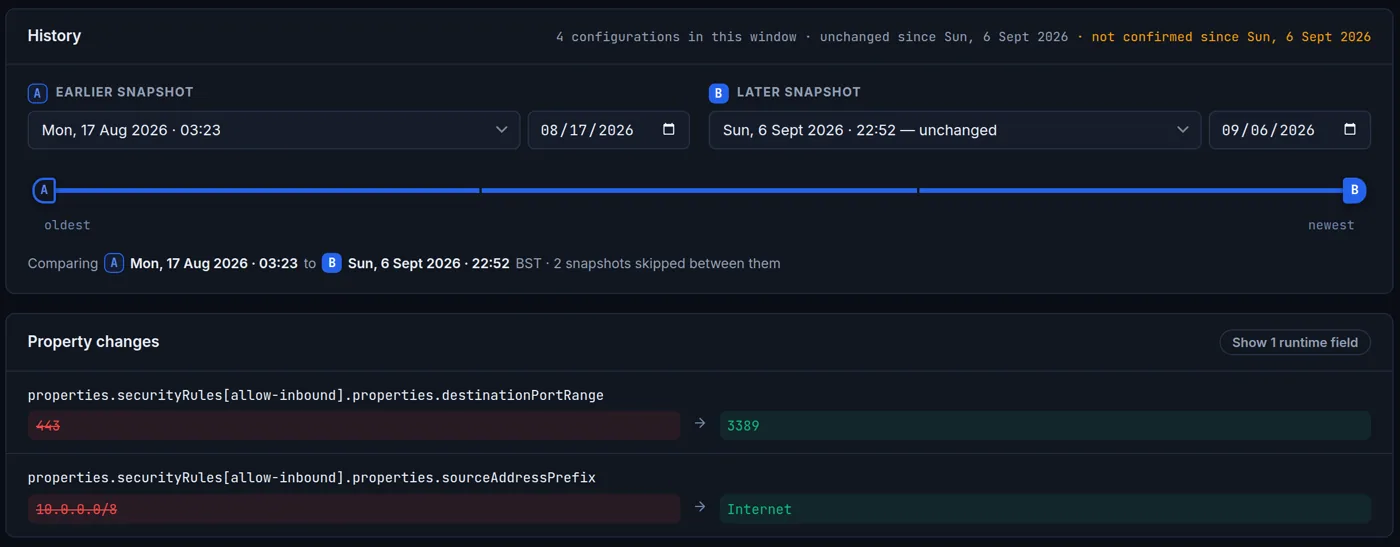
Pick any two points in a resource's history and see exactly which properties differ — by property path, not two walls of JSON.

  • Walk back through every snapshot until the setting was right.
  • The fields Azure rewrites on its own are folded away, so a real change is not buried under churn. Add one rule to an NSG and you see one added rule, not twelve moved ones.
  • A configuration that goes A to B and back to A is a revert, and Kronikl keeps all three snapshots.
The History and Property changes panels for nsg-prod-web: a scrubber between an earlier snapshot on 17 August 2026 and a later one on 6 September 2026, and two changed properties — the allow-inbound rule's destination port range from 443 to 3389, and its source address prefix from 10.0.0.0/8 to Internet — with one runtime field folded away.

An export your auditor can actually use

One request produces the whole date range as CSV or JSON, streamed, with no row cap.

  • The export includes the routine platform events the timeline hides, with routine as a column.
  • Every row says where the fact came from — Azure, or filled in later by Kronikl — and when. If your plan's window clamped the range you asked for, the response says so explicitly.
  • Give an external auditor an account scoped to one subscription or one resource group, and the export honors that scope like every other screen.

Rules that watch for the things you would otherwise find later

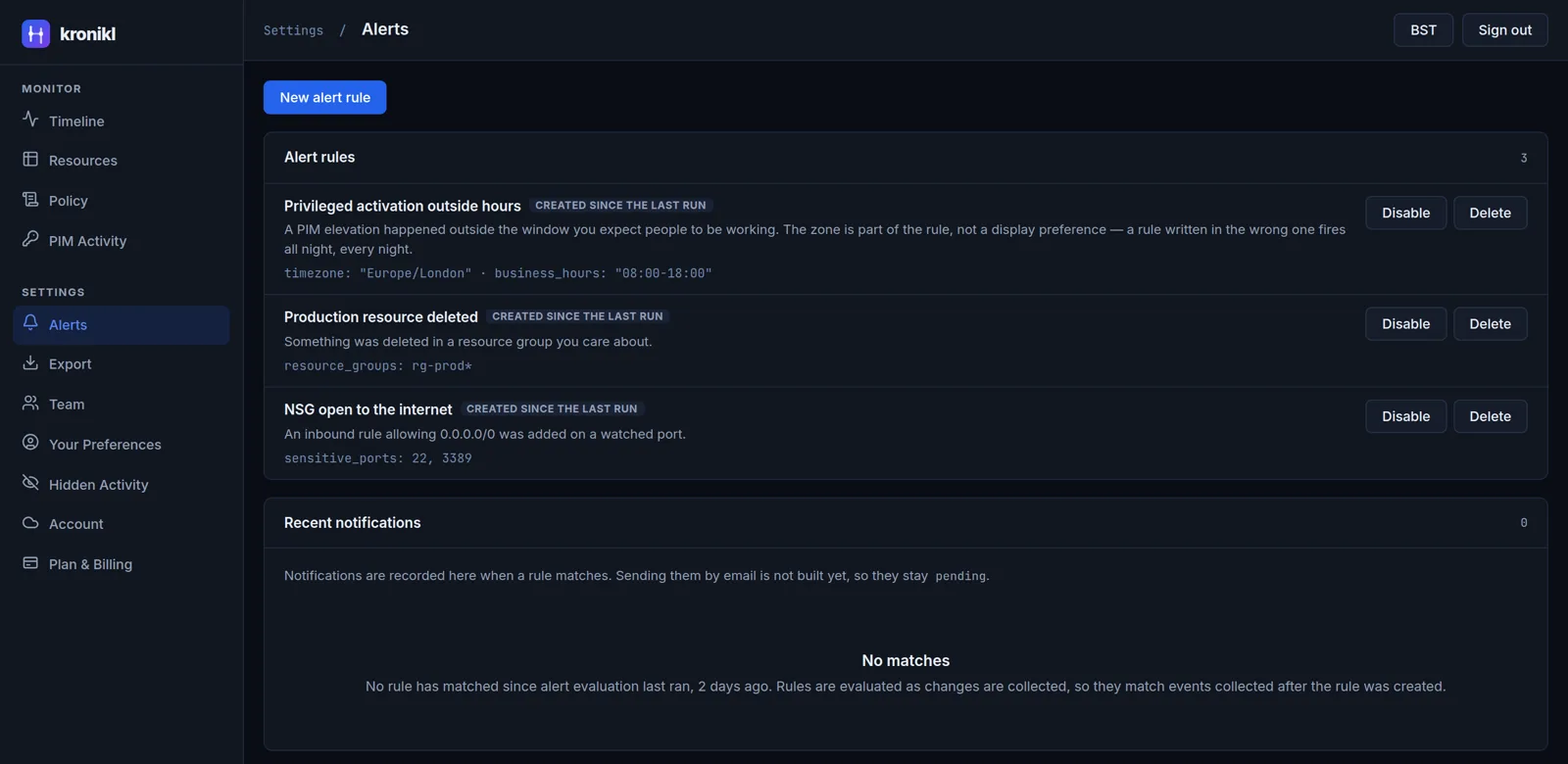
Set a rule and Kronikl watches for it: a privileged role granted, a resource deleted in a production resource group, an NSG opened to the internet, or a policy assignment removed. Matches are grouped, so a burst is one finding rather than four hundred, and they appear in the app.

The Alerts screen with three rules: privileged activation outside hours, with a timezone and business hours; production resource deleted, for resource groups matching rg-prod; and NSG open to the internet, watching ports 22 and 3389. Below them, recent notifications, with none matched yet.

Reader, granted by you, revoked by you

Connecting your Azure environment is a real decision. These are the three things it grants.

  • Read-only, always

    The role Kronikl asks for is Reader, Azure's built-in read-only role. There is no write or delete anywhere in it.

  • You grant it, in one click

    Press Create the role assignment and Kronikl makes it there and then — with your own Azure sign-in, under your name in your Activity Log, after showing you the role, the principal and every scope it will apply to. Or take the same grant as a command, for an account that cannot create role assignments.

  • Nothing stored, revoked in one click

    No secret, no password and no API key against your tenant. Withdraw consent and access stops within minutes.

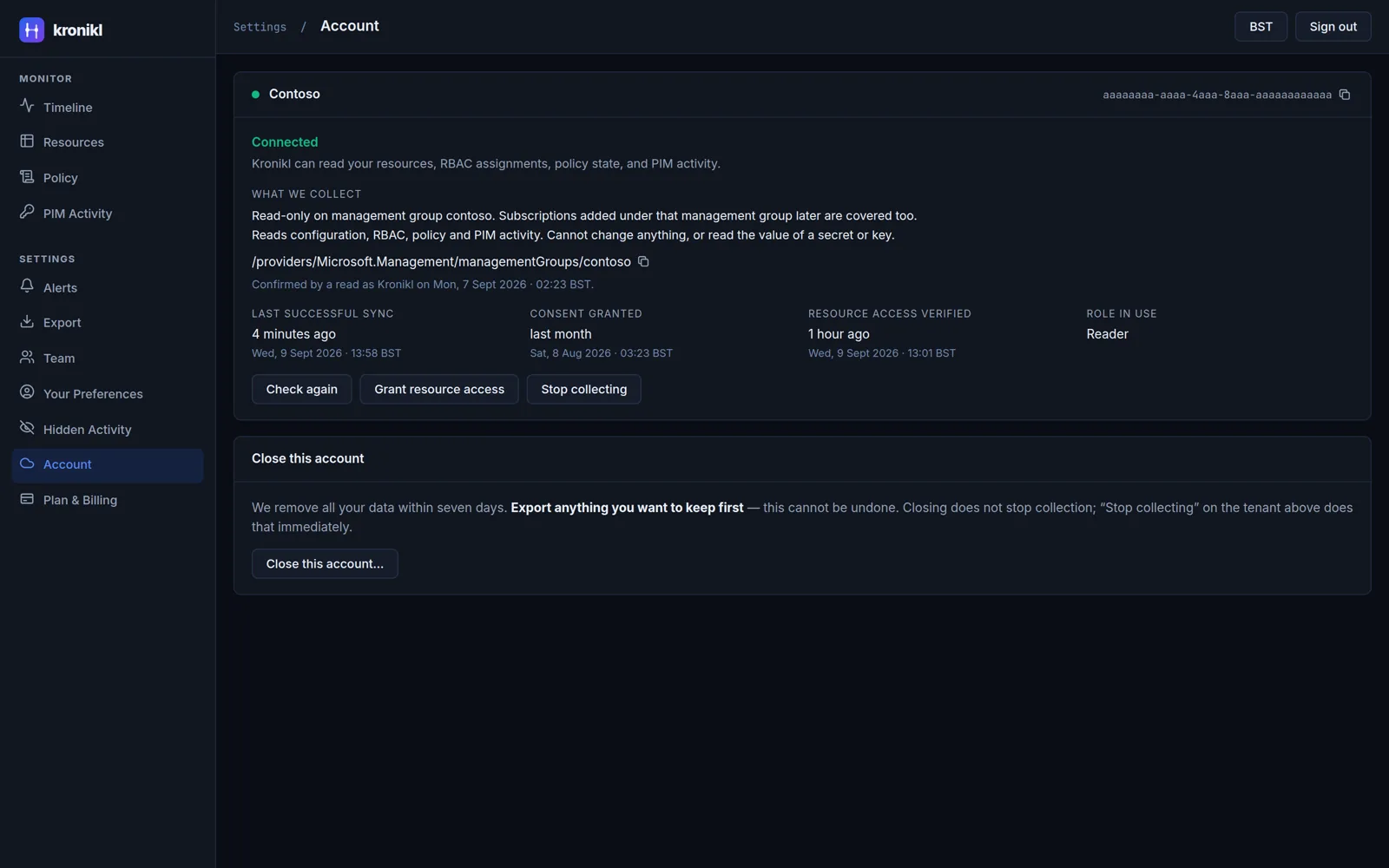
The Account screen for a connected tenant: Connected, read-only on the management group, with the role in use shown as Reader, when consent was granted and when resource access was last verified, and three buttons — Check again, Grant resource access, Stop collecting — above a Close this account section.

How Kronikl compares

If you use the Azure portal

Azure portal Kronikl
Configuration history
14 days of change records, no config 14 or 90 days, with the config either side
Comparing two points in time
Not available Property-level diff
Reading the Activity Log
Raw JSON, one subscription at a time One filterable feed across subscriptions

If you already have a SIEM

Your SIEM Kronikl
Who it is for
A SOC analyst Whoever administers the tenant
Query language
KQL, and rules to maintain Filters and a URL
Point-in-time config diff
Not what log search is for The core of the product

If you are weighing an audit suite

An audit suite Kronikl
Scope
AD, file shares, on-premises, Azure Azure only, and deeper for it
Getting started
Agents, collectors, a project Admin consent and one role assignment
Commitment
An annual contract A free plan

Start on Pro, stay free after the trial if it fits.

Every new organization gets 90 days of history for its first two weeks. After that, Free keeps 14 days at one scope, and Pro keeps 90 across your whole estate for $100 a month.

Free

$0/month

A real tenant. Real history.

  • 14 days of queryable history, at one scope
  • The full timeline, diff, resources and export
  • Alert rules, and their findings in the app
  • Unlimited team members from your tenant
Connect your tenant

Questions before you sign up

Can Kronikl change anything in my Azure environment?

No. Every permission we request is read-only.

How quickly does a change appear?

Usually within a couple of minutes of Azure recording it.

Where is my data stored?

In the United States, on Microsoft Azure. Azure encrypts managed database storage at rest by default, and everything is served over TLS.

What happens to the noisy platform events?

Hidden by default, and one click away when you want them.

What happens to my data if I stop using Kronikl?

Close your account from inside Kronikl and we delete everything within seven days, then confirm by email. If you simply stop signing in, nothing is deleted: your history stays until you ask. You can also stop collection from a tenant on its own, which leaves the history you already have readable and exportable.

Stop guessing what changed.

Connect your tenant and Kronikl starts recording within minutes.

Connect your tenant See exactly what it can reach